Cost & profit
Every project's contract, cost so far, plan and forecast, and the company's margin across them.
Cost & profit shows every project’s money in one place, in your company’s own currency.
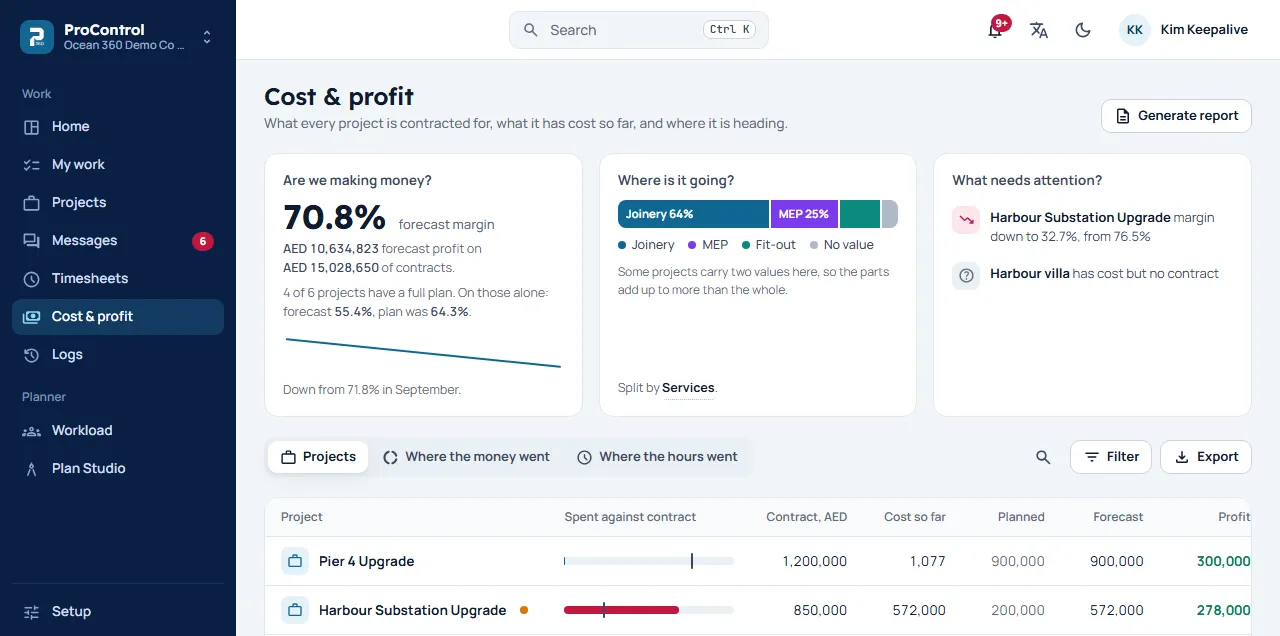
At the top
- Are we making money?: the forecast margin across your projects, and how it has moved.
- Where is it going?: how the money splits, by the tag you choose.
- What needs attention?: the projects to look at first.
The projects
Each row shows a project’s Contract, Cost so far, Planned cost, Forecast, Profit and Margin, with a bar of what is spent against the contract. Click a row to see what the cost is made of, who spent the hours, month by month, and what changed.
Filter narrows the list by status, client, health (On track, At risk, Losing money) and tags, and you can search by project, code or client. Where the money went and Where the hours went split the same cost by tag, cost type, person or month, and by kind of work.
How the numbers are made
- Labour: each hour, times the cost stamped on it the day it was logged.
- Contract: the base contract plus approved variations.
- Forecast: once the project reports progress and has labour cost, the labour scaled to 100% complete, plus direct costs. Before that, the plan, never below what is already spent.
Reports
Export downloads the list as a CSV file. Generate report builds an Excel report: profitability, cost, utilisation or evaluations.
A project in a currency with no exchange rate is left out of the totals until it has one.